
Warning
This documentation is for an old version of IPython. You can find docs for newer versions here.
Module: utils.text
Utilities for working with strings and text.
Inheritance diagram:
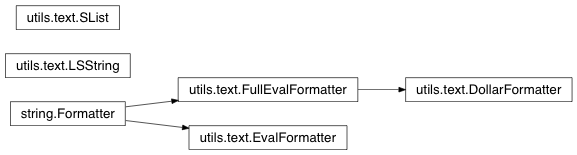
5 Classes
-
class
IPython.utils.text.LSString¶ Bases:
strString derivative with a special access attributes.
These are normal strings, but with the special attributes:
.l (or .list) : value as list (split on newlines). .n (or .nlstr): original value (the string itself). .s (or .spstr): value as whitespace-separated string. .p (or .paths): list of path objectsAny values which require transformations are computed only once and cached.
Such strings are very useful to efficiently interact with the shell, which typically only understands whitespace-separated options for commands.
-
class
IPython.utils.text.SList¶ Bases:
listList derivative with a special access attributes.
These are normal lists, but with the special attributes:
- .l (or .list) : value as list (the list itself).
- .n (or .nlstr): value as a string, joined on newlines.
- .s (or .spstr): value as a string, joined on spaces.
- .p (or .paths): list of path objects
Any values which require transformations are computed only once and cached.
-
fields(*fields)¶ Collect whitespace-separated fields from string list
Allows quick awk-like usage of string lists.
Example data (in var a, created by ‘a = !ls -l’):
-rwxrwxrwx  1 ville None      18 Dec 14  2006 ChangeLog
drwxrwxrwx+ 6 ville None       0 Oct 24 18:05 IPython
a.fields(0)is['-rwxrwxrwx', 'drwxrwxrwx+']a.fields(1,0)is['1 -rwxrwxrwx', '6 drwxrwxrwx+'](note the joining by space).a.fields(-1)is['ChangeLog', 'IPython']
IndexErrors are ignored.
Without args, fields() just split()’s the strings.
-
grep(pattern, prune=False, field=None)¶ Return all strings matching ‘pattern’ (a regex or callable)
This is case-insensitive. If prune is true, return all items NOT matching the pattern.
If field is specified, the match must occur in the specified whitespace-separated field.
Examples:
a.grep( lambda x: x.startswith('C') )
a.grep('Cha.*log', prune=1)
a.grep('chm', field=-1)
-
sort(field=None, nums=False)¶ sort by specified fields (see fields())
Example:
a.sort(1, nums = True)
Sorts a by second field, in numerical order (so that 21 > 3)
-
class
IPython.utils.text.EvalFormatter¶ Bases:
string.FormatterA String Formatter that allows evaluation of simple expressions.
Note that this version interprets a : as specifying a format string (as per standard string formatting), so if slicing is required, you must explicitly create a slice.
This is to be used in templating cases, such as the parallel batch script templates, where simple arithmetic on arguments is useful.
Examples
In [1]: f = EvalFormatter()
In [2]: f.format('{n//4}', n=8)
Out[2]: '2'

In [3]: f.format("{greeting[slice(2,4)]}", greeting="Hello")
Out[3]: 'll'
-
class
IPython.utils.text.FullEvalFormatter¶ Bases:
string.FormatterA String Formatter that allows evaluation of simple expressions.
Any time a format key is not found in the kwargs, it will be tried as an expression in the kwargs namespace.
Note that this version allows slicing using [1:2], so you cannot specify a format string. Use
EvalFormatterto permit format strings.Examples
In [1]: f = FullEvalFormatter()
In [2]: f.format('{n//4}', n=8)
Out[2]: u'2'

In [3]: f.format('{list(range(5))[2:4]}')
Out[3]: u'[2, 3]'

In [4]: f.format('{3*2}')
Out[4]: u'6'
-
class
IPython.utils.text.DollarFormatter¶ Bases:
IPython.utils.text.FullEvalFormatterFormatter allowing Itpl style $foo replacement, for names and attribute access only. Standard {foo} replacement also works, and allows full evaluation of its arguments.
Examples
In [1]: f = DollarFormatter()
In [2]: f.format('{n//4}', n=8)
Out[2]: u'2'

In [3]: f.format('23 * 76 is $result', result=23*76)
Out[3]: u'23 * 76 is 1748'

In [4]: f.format('$a or {b}', a=1, b=2)
Out[4]: u'1 or 2'
13 Functions
-
IPython.utils.text.indent(instr, nspaces=4, ntabs=0, flatten=False)¶ Indent a string a given number of spaces or tabstops.
indent(str,nspaces=4,ntabs=0) -> indent str by ntabs+nspaces.
Parameters: instr : basestring
The string to be indented.
nspaces : int (default: 4)
The number of spaces to be indented.
ntabs : int (default: 0)
The number of tabs to be indented.
flatten : bool (default: False)
Whether to scrub existing indentation. If True, all lines will be aligned to the same indentation. If False, existing indentation will be strictly increased.
Returns: str|unicode : string indented by ntabs and nspaces.
-
IPython.utils.text.list_strings(arg)¶ Always return a list of strings, given a string or list of strings as input.
Examples
In [7]: list_strings('A single string')
Out[7]: ['A single string']

In [8]: list_strings(['A single string in a list'])
Out[8]: ['A single string in a list']

In [9]: list_strings(['A','list','of','strings'])
Out[9]: ['A', 'list', 'of', 'strings']
-
IPython.utils.text.marquee(txt='', width=78, mark='*')¶ Return the input string centered in a ‘marquee’.
Examples
In [16]: marquee('A test',40)
Out[16]: '**************** A test ****************'

In [17]: marquee('A test',40,'-')
Out[17]: '---------------- A test ----------------'

In [18]: marquee('A test',40,' ')
Out[18]: '                 A test                 '
-
IPython.utils.text.num_ini_spaces(strng)¶ Return the number of initial spaces in a string
-
IPython.utils.text.format_screen(strng)¶ Format a string for screen printing.
This removes some latex-type format codes.
-
IPython.utils.text.dedent(text)¶ Equivalent of textwrap.dedent that ignores unindented first line.
This means it will still dedent strings like: ‘’‘foo is a bar ‘’‘
For use in wrap_paragraphs.
-
IPython.utils.text.wrap_paragraphs(text, ncols=80)¶ Wrap multiple paragraphs to fit a specified width.
This is equivalent to textwrap.wrap, but with support for multiple paragraphs, as separated by empty lines.
Returns: list of complete paragraphs, wrapped to fill ncolscolumns.
-
IPython.utils.text.long_substr(data)¶ Return the longest common substring in a list of strings.
-
IPython.utils.text.strip_email_quotes(text)¶ Strip leading email quotation characters (‘>’).
Removes any combination of leading ‘>’ interspersed with whitespace that appears identically in all lines of the input text.
Parameters: text : str Examples
Simple uses:
In [2]: strip_email_quotes('> > text')
Out[2]: 'text'

In [3]: strip_email_quotes('> > text\n> > more')
Out[3]: 'text\nmore'
Note how only the common prefix that appears in all lines is stripped:
In [4]: strip_email_quotes('> > text\n> > more\n> more...')
Out[4]: '> text\n> more\nmore...'
So if any line has no quote marks (‘>’) , then none are stripped from any of them
In [5]: strip_email_quotes('> > text\n> > more\nlast different')
Out[5]: '> > text\n> > more\nlast different'
-
IPython.utils.text.strip_ansi(source)¶ Remove ansi escape codes from text.
Parameters: source : str
Source to remove the ansi from
-
IPython.utils.text.compute_item_matrix(items, empty=None, *args, **kwargs)¶ Returns a nested list, and info to columnize items
Parameters: items
list of strings to columize
empty : (default None)
default value to fill list if needed
separator_size : int (default=2)
How much caracters will be used as a separation between each columns.
displaywidth : int (default=80)
The width of the area onto wich the columns should enter
Returns: strings_matrix
nested list of string, the outer most list contains as many list as rows, the innermost lists have each as many element as colums. If the total number of elements in
itemsdoes not equal the product of rows*columns, the last element of some lists are filled withNone.dict_info
some info to make columnize easier:
- columns_numbers
number of columns
- rows_numbers
number of rows
- columns_width
list of with of each columns
- optimal_separator_width
best separator width between columns
Examples
In [1]: l = ['aaa','b','cc','d','eeeee','f','g','h','i','j','k','l']
   ...: compute_item_matrix(l,displaywidth=12)
Out[1]:
    ([['aaa', 'f', 'k'],
    ['b', 'g', 'l'],
    ['cc', 'h', None],
    ['d', 'i', None],
    ['eeeee', 'j', None]],
    {'columns_numbers': 3,
    'columns_width': [5, 1, 1],
    'optimal_separator_width': 2,
    'rows_numbers': 5})
-
IPython.utils.text.columnize(items, separator=' ', displaywidth=80)¶ Transform a list of strings into a single string with columns.
Parameters: items : sequence of strings
The strings to process.
separator : str, optional [default is two spaces]
The string that separates columns.
displaywidth : int, optional [default is 80]
Width of the display in number of characters.
Returns: The formatted string.
-
IPython.utils.text.get_text_list(list_, last_sep=' and ', sep=', ', wrap_item_with='')¶ Return a string with a natural enumeration of items
>>> get_text_list(['a', 'b', 'c', 'd'])
'a, b, c and d'
>>> get_text_list(['a', 'b', 'c'], ' or ')
'a, b or c'
>>> get_text_list(['a', 'b', 'c'], ', ')
'a, b, c'
>>> get_text_list(['a', 'b'], ' or ')
'a or b'
>>> get_text_list(['a'])
'a'
>>> get_text_list([])
''
>>> get_text_list(['a', 'b'], wrap_item_with="`")
'`a` and `b`'
>>> get_text_list(['a', 'b', 'c', 'd'], " = ", sep=" + ")
'a + b + c = d'